It's the first of the month and your payment dashboard shows four failed charges. One belongs to a card that expired last week. One belongs to a customer who's been with you for fourteen months and whose account is now sitting past due. One is a $9 plan you'd barely notice. The fourth came back with a reason code that reads like a shrug.
The instinct is to treat all four the same: let the retry logic grind, or let the dunning emails fire. That's where revenue leaks. A failed payment isn't a billing error. It's a subscriber who may still want your product and either hasn't been told there's a problem or hasn't been given a working way to fix it. The work this week is sorting them, deciding which ones a retry can rescue, and talking to the customers whose banks need something from them before the next attempt.
Table of Contents
- Sort Each Failed Payment by Its Decline Reason
- How to Diagnose a Failed Subscription Payment in Five Steps
- Retry Schedule That Recovers Failed Subscription Charges
- What to Say in Failed Payment Emails That Get a Response
- Telling Involuntary Churn From Real Cancellations
- Preventing Repeat Failures Before the Next Renewal
- Confirm Your Failed Payment Process This Week
Sort Each Failed Payment by Its Decline Reason
Two failed charges can look identical on a dashboard and need opposite responses. One is a soft decline a retry will clear on Thursday when the customer's paycheck lands. The other is an expired card that will fail every attempt you schedule until someone types in a new number. Sorting them before you act is what separates recovered revenue from churned subscribers.
The scale justifies the effort. The Kaplan Collection Agency's 2025 subscription statistics put average payment failure rates across industries at 7.9%, with rates reaching 14.7% in some sectors. Bill a thousand subscribers a month and that's dozens of declines every cycle, each with its own cause and its own fix. Card-not-present traffic declines more often than a card handed across a counter: Worldpay's analysis of declined transactions puts online authorization declines at roughly 15%, against about 4% when the card is physically present.
A failed payment is a charge attempt that didn't succeed, whether or not a later retry saved it. Report on that definition, because it keeps every row below in your records, including the ones you recover inside a day.
| Decline reason | What it usually means | Recovered by retry alone? | Next action |
|---|---|---|---|
| Insufficient funds | Balance too low on the charge date | Often, on a later date | Retry after a few days, then send a reminder |
| Expired card | Card is past its expiry date | No | Request a new card or use an account updater |
| Incorrect card details | Wrong card number, CVC or postcode | No | Ask the customer to re-enter details |
| Issuer decline, no reason given | Bank declined without specifying why | Sometimes | Retry once or twice, then contact the customer |
| Authentication required | Bank requires 3D Secure or confirmation | No, until the customer confirms | Send a payment link that triggers authentication |
| Suspected fraud | Issuer or fraud rules blocked the charge | Sometimes | Ask the customer to contact the bank or use another card |
| Processor or network timeout | System fault or timeout | Usually yes | Retry within a day and check processor status |
Retrying the wrong row costs you twice. An expired card fails every attempt, so a five-attempt schedule against it spends two weeks of access you'll never collect on. A suspected-fraud block reads as a soft decline in most dashboards, and hammering it can push the issuer toward a harder block, which makes the customer's next call to their bank considerably less pleasant.
The sorting rule: if waiting fixes it, retry. If it needs the customer, contact them before the next attempt.
Exceptions to that rule need a trail, particularly when someone extends access for a high-value account or writes off a balance. The mechanics are the same ones behind how finance teams govern Slack approvals: a named approver, a stated reason, and a record you can audit three months later when the customer swears they were charged twice.
How to Diagnose a Failed Subscription Payment in Five Steps
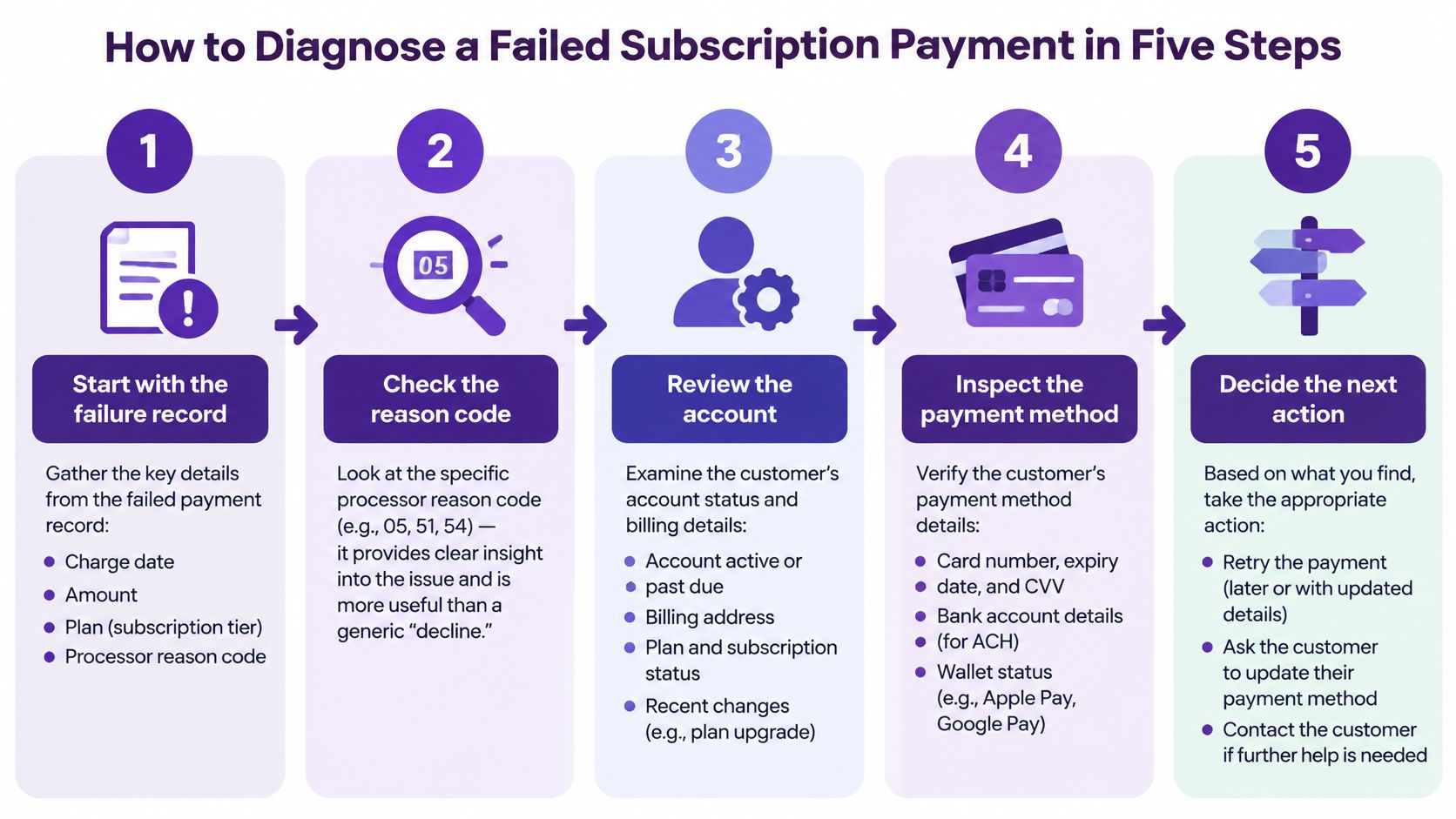
Sorting happens at portfolio level. Diagnosis happens one invoice at a time, and it starts with the failure record rather than the customer's inbox. Pull the charge date, the amount, the plan and the processor's reason code together before you decide anything. A specific code such as "expired card" or "do not honor" points at one lever; a generic "declined" tells you only that the bank said no.
Here's the working order I'd follow for a single failed charge.
-
Check whether this is a retry of an earlier attempt. If the same invoice has failed three times this week, you have one failed payment, not three. The slip is importing every webhook event and letting the count run, which inflates your failure rate to crisis levels and hides the accounts that are stuck.
-
Check the card details. Look at expiry, whether the card was replaced recently, and whether the billing country differs from the one on the signup. A corporate card issued in another country trips fraud rules that a domestic card sails through, and knowing that changes your next action from "retry" to "ask for a different card."
-
Match the payment to the signup. Email is the first key. If the customer paid under a different address, capture a visitor id at checkout or match on the success page, so a paying customer doesn't sit in your system as an unpaid account.
-
Review earlier failures on this account. Two or more in a row is a different risk from a single decline, especially if the card changed between them. That pattern usually means the customer is trying to pay and something on the issuer side keeps refusing, which is a support conversation rather than a retry problem.
-
Choose the next action from the decline table and write it down with the date. Retry, contact, or pause. The slip is leaving the decision verbal, so one person retries on day 2 and another cancels on day 4.
What a clean diagnosis looks like
One invoice, one reason, one next action, recorded with a date. If you can't state the reason in a specific code, the diagnosis isn't finished.
The first retry result isn't final either. A successful retry proves the card worked once, not that it's fixed, and a customer who clears on attempt two may fail again next month for the same underlying reason.
Retry Schedule That Recovers Failed Subscription Charges
| Day after failure | Retry | Access |
|---|---|---|
| Day 0 | None, record the failure | Full access |
| Day 1 | First automatic retry | Full access |
| Day 3 | Second retry, first reminder sent | Full access |
| Day 7 | Third retry | Full access, account flagged as at risk |
| Day 10 | Final retry, final notice sent | Full access until the notice date |
| Day 14 | Last retry, then pause or end access | Ends per your written policy |
Treat this as a default for a monthly charge, not a law. Day 0 keeps full access because the customer has paid for the current period and has done nothing wrong. Day 1 catches the insufficient-funds cases that clear after a payday. By Day 3 the second attempt and the first reminder go out together, since a customer updating their card does more recovery work than a third blind retry. Day 7 splits accounts that need watching from accounts that need a decision, and Day 10 to 14 is where a written access policy keeps the ending from being improvised.
Why the spacing matters
Retries bunched into 48 hours hit the same issuer limit that caused the first decline, and to fraud rules they look like card testing. Retries spread over six weeks give a customer who would have paid on day 3 a second month of free access before anyone notices.
Front-load the schedule. The early attempts carry most of the recovery value, because a soft decline that was going to clear usually clears fast. The later retries exist to catch payday timing, not to grind out a win against a card that has refused you four times.
A schedule you can't explain to a customer in one sentence is a schedule you'll abandon the first month it gets awkward.
Two exceptions break the pattern. An expired or replaced card skips the whole timeline and goes straight to a contact, because every retry fails until new details arrive. And turn on your processor's account updater where it is offered, so replaced cards refresh themselves between attempts instead of waiting on a reply.
What to Say in Failed Payment Emails That Get a Response
Three messages, each with a separate job. Many teams send one long email or five identical ones, and both get ignored.
The first notice lands around Day 3. It names the plan, the amount and the failed date, stays blame-free, and carries one link to the update page. A solo founder on a $29 monthly plan could write: "Your $29 renewal didn't go through. Update your card in under a minute and your access continues without interruption." No apology, no lecture about the bank, no explanation of decline codes.
The second notice around Day 7 explains what happens next and offers a second route in. Something like: "We'll try the card again on the 9th. If it's easier, reply to this email and we'll send a payment link for a different card." That second option matters for customers whose company card has been cancelled and who can't produce a replacement this week.
The final notice between Day 10 and Day 14 states the exact date access changes and exactly how to restore it: update the payment details and the subscription resumes. "Your access ends on June 14 unless your payment details are updated. Update them here and nothing changes." One specific date beats three paragraphs of warning.
What to avoid in the wording
Words like urgent and final warning push people toward cancel rather than toward their wallet. More than one payment link per message splits attention and gets flagged as promotion. Subject lines matter too, and running your copy through a spam trigger words checker before you load it into the billing system is a five-minute job that keeps the email in the inbox where it can be acted on.
Keep the reply path open and answered. A customer who replies to a failed-payment email wants to fix the problem, and a reply that goes to a no-reply address turns a recoverable account into a lost one.
The takeaway: a failed-payment email should make the next step obvious, not explain why the failure happened.
Telling Involuntary Churn From Real Cancellations
Some subscribers leave without clicking cancel. The renewal fails, the card never gets updated, access stops, and nobody decided anything. That outcome is involuntary churn, a cancellation caused by a failed payment rather than a decision to leave, and it's often recoverable.
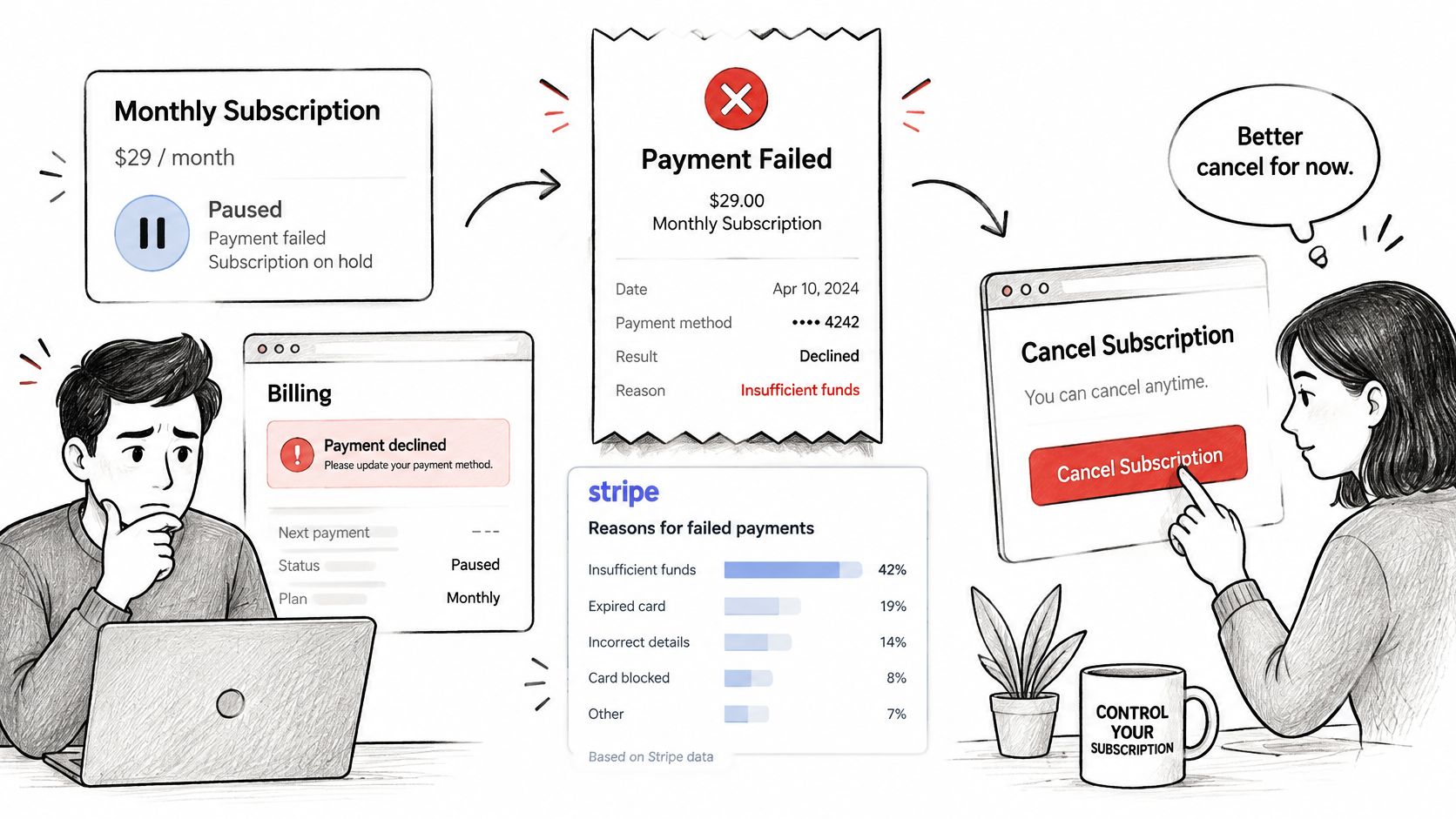
Stripe's 2024 subscription data identifies insufficient funds as the most common cause of payment failure, and reports that a monthly subscription recovered after a payment failure continues for an average of seven additional months. That's the number that makes this worth reporting properly: recovery isn't one saved invoice, it's most of a year of revenue.
The reporting problem is co-mingling. When a failed charge and a deliberate cancellation sit in the same churn number, the easy fix (a new card) and the hard problem (price or product fit) look identical on the dashboard. Stripe's 2024 benchmark on churn management for subscription businesses shows involuntary churn ranging from 11% to 35% of overall churn depending on segment, which is too wide a band to plan against unless you measure your own.
Here's the video walkthrough of how payment failure turns into cancellation:
The sort itself is cheap. Flag every cancellation that happened within 14 days of a failed charge, then check whether that customer ever opened the cancel page. No visited cancel page plus a recent decline is involuntary until proven otherwise. If they did open it, read the exit survey before you send anything.
Recovery follows the sort. Involuntary cases get a short win-back message within a week, offering the update-payment path rather than a discount. Paused accounts get the same path with a clear statement of what resumes and when. And the weekly rule that keeps this honest: if the customer never chose to cancel, count the loss separately and treat it as recoverable before you count it as lost. A customer churn analysis that separates the two causes will show you which one is growing.
Preventing Repeat Failures Before the Next Renewal
Most of this work happens before the charge ever fails. Five moves reduce the volume you'll be diagnosing next month.
-
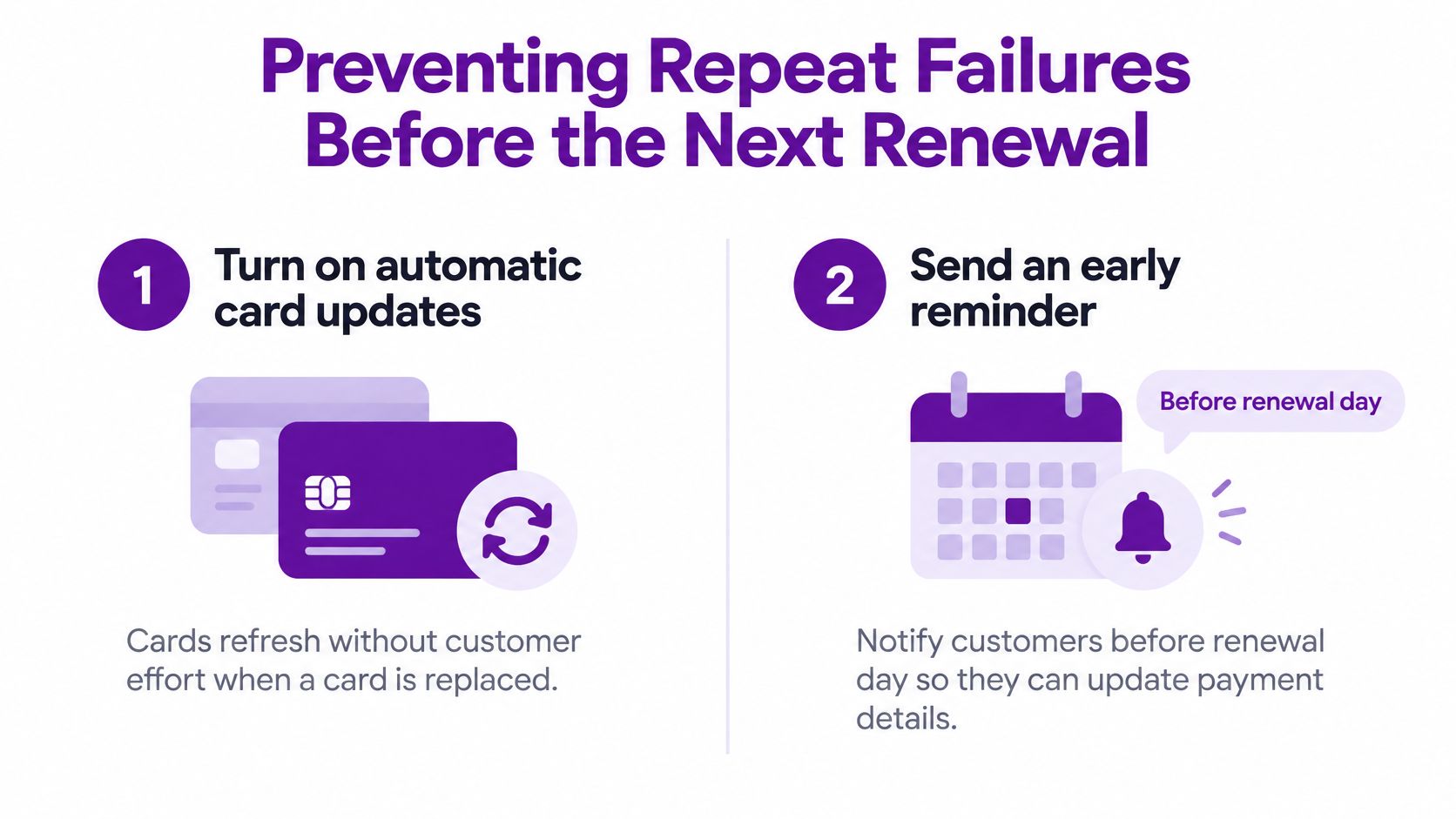
Turn on automatic card updates where your processor offers them. When a bank issues a replacement card, the updater refreshes the stored details without the customer doing anything, which removes an entire category of expiry failures from your queue.
-
Send an update request about 30 days before a card's expiry date, while the customer still has time to act without losing access. Pull the list from your stored payment methods, not from memory. A reminder that arrives after the card has already died is a collection notice, not a courtesy.
-
Offer repeat failers an annual plan at a clear discount. Twelve renewal decisions become one, and a customer who has failed twice on monthly billing is a reasonable candidate. This is a retention move, not a pricing experiment.
-
Check false declines before you blame the customer. When fraud rules block legitimate charges, the pattern shows up as billing-country and device mismatches on otherwise healthy accounts. Mastercard cites research showing more than four in ten consumers would never shop with a business again after a false decline, and false declines generated an estimated $50.7 billion in lost sales across the United States, United Kingdom, France and Germany in 2022, per PNC's payment optimization overview. Review the decline reasons from your first sort and loosen the rule that keeps firing.
-
Write the retry and access rules down and review them quarterly against recovered and lost revenue. Rules that live in one person's head vanish when that person changes teams.
The mistake that costs the most is waiting until a card has expired and then sending a generic reminder to everyone at once. It treats a solvable, dated problem as a broadcast.
The habit that keeps failure rates low is a monthly look at accounts with repeated failures, not an annual audit. Twenty minutes on the accounts with two or more declines tells you whether you have a card problem, a segment problem, or a product problem. If the numbers need a wider frame, here's how to reduce customer churn across the whole base rather than just the billing edge.
Confirm Your Failed Payment Process This Week
Three setup actions, one metric, and you're running a process instead of reacting to emails.
-
Pull every failed charge from the last 30 days with customer, plan, amount, date and processor reason code in one file.
-
Sort each one into the decline categories and count each invoice once even if it was retried several times. Mark every row as retry-only, customer action, or timeout.
-
Write the retry schedule and the access rule with real dates, Day 0 through Day 14, then draft the three customer messages. Store the document where whoever handles billing next can find it, so a Day 7 decision never depends on someone's memory.
Then pick one number and track it: recovered revenue as a share of failed revenue, calculated on invoices rather than attempts. Record it as this month's baseline, so next month tells you whether the schedule and the messages are working. In Chartsy that view is already assembled, with failed payments before cancellation, customers carrying two or more failures, and retention split between annual and monthly plans, while the Daily Briefing flags new failures in red on the day they land. If you want the churn side calculated on the same invoice data, start with the churn rate definition you'll report against.
A failed payment is a decision point, not a receipt for a customer you've lost. Chartsy connects your billing provider's invoice data to the traffic that produced each customer, so you can see which channels bring in subscribers who fail to pay, which plans recover after a decline, and how much recurring revenue sits in the failed-payment queue before it becomes churn. Connect Stripe, Paddle, Lemon Squeezy or Creem, and the daily briefing will show you the failures the morning they happen instead of at the end of the month. Visit Chartsy to start a 14-day trial that syncs your previous 24 months of billing data.

Written by
Chartsy TeamAnalytics team at Chartsy
The Chartsy Team writes guides, product updates, and resources to help SaaS and eCommerce founders make sense of their metrics, without SQL or spreadsheets.
Chartsy