
You can have a clean funnel in Google Analytics and still not know which channels actually pay back. That's the pain most SaaS founders run into, the numbers look healthy at the top, then Stripe or Paddle tells a different story once renewals, upgrades, downgrades, and churn enter the picture.
UTM tracking for SaaS solves that gap only if it survives the full journey, from the first visit to the billed customer record. If you stop at sessions, you're measuring attention. If you carry the source data into signup and billing, you can finally see which channels bring recurring revenue.
Table of Contents
- Why SaaS Founders Need UTM Tracking Beyond Traffic Numbers
- Building a UTM Naming Convention That Survives Real Use
- Capturing and Persisting UTMs From Visit to Signup
- Wiring UTMs Into Stripe and Paddle for Revenue Attribution
- Attributing MRR Movements Back to Acquisition Sources
- Validating and Auditing Your UTM Pipeline
- Operational Habits and Your Next Step With Chartsy
Why SaaS Founders Need UTM Tracking Beyond Traffic Numbers
A founder opens analytics and sees traffic, signups, and a few healthy-looking acquisition channels. Then they open Stripe and realize the paying customer count doesn't line up, and the best-looking source in the traffic report doesn't show up in the user records at all. That mismatch is the whole reason UTM tracking matters in SaaS.
UTM parameters are the campaign labels appended to URLs. The standard structure still revolves around utm_source, utm_medium, utm_campaign, utm_content, and utm_term, and modern analytics platforms surface that data in acquisition reports. In practice, that means a click from paid search, a partner newsletter, or a lifecycle email can be tied to a session instead of disappearing into “direct” or “other” traffic, and the same source can later be attached to signup and revenue events through your own data model. UTM analytics conventions for campaign attribution
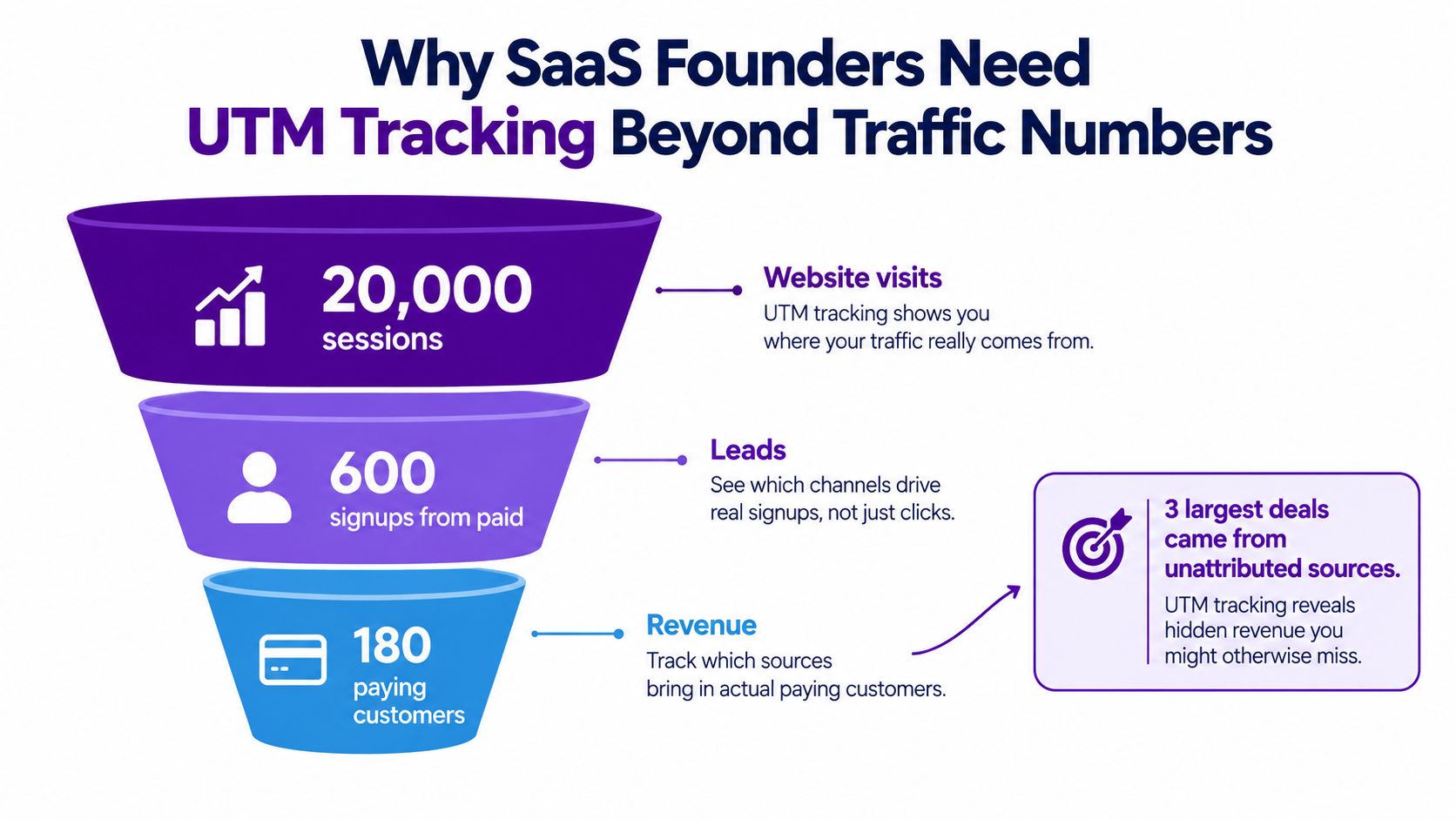
The shift is from asking “which channel got clicks?” to asking “which channel earned revenue?” A SaaS team can't justify spend on paid search, content syndication, or partner programs with traffic counts alone. They need to know which source created the account that later expanded, and which one only created low-value signups that never became subscriptions.
Practical rule: if the source data doesn't survive beyond the landing page, you don't have attribution, you have a short-lived label.
That's why UTM tracking for SaaS has to live in two places. First, it belongs on the visit. Second, it needs to persist onto the user and subscription records so later billing events still carry the original acquisition context. If you don't do both, retention, expansion, and churn all end up in unattributed MRR.
Building a UTM Naming Convention That Survives Real Use
The easiest UTM system to create is the one that ruins reporting later. One teammate uses Facebook, another uses facebook, and a third uses fb_ads, then your dashboard splits one channel into three rows that all mean the same thing. That's why the naming convention has to be decided before links go live.
Start with a fixed vocabulary
Keep the five standard parameters, but use them consistently. In SaaS, utm_source should come from a controlled list like google, linkedin, newsletter, or partner-x. utm_medium should stay equally tight, for example paid, organic, email, referral, or affiliate. utm_campaign should carry the actual campaign label, not a random ID dump, and utm_content should only appear when you need to compare creative variants.
Lowercase only. Use hyphens instead of spaces or underscores. That simple discipline prevents duplicate rows such as facebook versus Facebook, which otherwise forces manual cleanup later. A practical methodology for SaaS attribution also recommends validating links in real time before launch so the naming system is tested before the campaign starts common UTM tracking mistakes and fixes.
Make the taxonomy boring on purpose
A shared spreadsheet is enough for small teams if it's kept current. The point isn't elegance, it's mergeability. If two links point to the same channel, they should collapse into the same row. If two campaigns are genuinely different, they should split cleanly.
Use one source list, one medium list, and one campaign pattern. The moment people invent their own variants, reporting gets noisy and nobody trusts the totals.
A simple pattern that works well in SaaS is a date-based campaign format like yyyy-mm-channel-themename. That gives you a readable label without creating a naming zoo. I'd also avoid putting campaign IDs into utm_source, because source should describe where the traffic came from, not the internal database key you used to create it.
Capturing and Persisting UTMs From Visit to Signup
UTM data is fragile because it usually arrives on the first pageview and the signup happens later, sometimes on another subdomain, sometimes after email verification, sometimes after an auth redirect. Every one of those steps can strip the source unless you capture it early and store it somewhere durable.
Capture on arrival, not at the form
The first job is to read the utm_* values from the landing page URL as soon as the visitor arrives. Then store them in a first-party cookie and localStorage, so you have a fallback if the user clicks around before signing up. If your marketing site and app live on different subdomains, make sure the values are available across that boundary before the signup form is submitted.
The next step is to post the stored values with the signup form itself. Hidden form fields are the simplest path, because they let the backend receive the acquisition context alongside the account creation event. If cookies are blocked or the browser strips them, server-side capture gives you a backup route so you don't lose every source when the client side fails. Independent SaaS guidance also emphasizes storing UTMs on the trial or account record at the moment of arrival, not waiting until later in the lifecycle UTM tracking for SaaS trial signups.
Write one source row onto the user record
Once the signup is complete, persist a single source row onto the user or account table. That record should become the canonical acquisition reference for later product events and billing joins. Don't keep rewriting the original source every time the user returns from a new session, or you'll turn attribution into a moving target.
This related guide on website visitor to paying customer tracking covers the same persistence problem from the signup-to-customer angle, and it's the right reference point if your current issue is losing UTMs between the first visit and account creation.
A clean pipeline usually looks like this:
- Arrival capture: Read
utm_*from the first landing page and store them immediately. - Persistence layer: Keep the values in first-party storage and pass them through redirects and form submits.
- Signup write: Save the canonical source on the user or trial record.
- Later reuse: Join that source to subscription events when billing starts.
That sequence is the difference between a session tag and a durable acquisition record.
Wiring UTMs Into Stripe and Paddle for Revenue Attribution
Once the signup record carries the source fields, the billing system needs to inherit them. That's where the attribution pipeline stops being marketing-only and becomes revenue-aware. The practical goal is simple, every subscription event should still know where the customer came from.
Attach the source to the customer, then carry it forward
In Stripe, the usual pattern is to write the UTM fields into customer metadata at creation time and mirror them on the subscription object if your billing flow needs the context on each invoice or webhook event. In Paddle, the equivalent move is to store them in customer-facing custom fields so downstream billing events can be reconciled against the acquisition source. The important part is consistency, not cleverness.
Webhooks matter here because the source has to survive more than the initial charge. Plan changes, renewals, reactivations, and subscription updates all need to land against the same acquisition record. If you only stamp the first invoice, you'll lose the path from source to recurring revenue.
This Stripe metadata guide is useful when you're deciding what belongs on the customer object versus the subscription object, especially if you want the same fields available for later reporting and reconciliation.
| UTM Field | Stripe Metadata Key | Paddle Custom Field | Notes |
|---|---|---|---|
| utm_source | utm_source |
utm_source |
Use a lowercase source value from your controlled taxonomy |
| utm_medium | utm_medium |
utm_medium |
Keep medium values standardized across campaigns |
| utm_campaign | utm_campaign |
utm_campaign |
Store the human-readable campaign label, not an internal ID |
| utm_content | utm_content |
utm_content |
Only populate when you're testing variants or placements |
| utm_term | utm_term |
utm_term |
Usually reserved for keyword or search intent detail |
Idempotency matters too. If a webhook retries, it shouldn't create duplicate attribution rows or overwrite the right source with a later, unrelated one. Keep the original acquisition payload stable, then append billing events as they happen. That gives you a reliable join from marketing source to subscription movement instead of a pile of inconsistent updates.
Attributing MRR Movements Back to Acquisition Sources
Traffic attribution gets you to signup. Revenue attribution tells you whether the channel actually produced durable business value. The difference is most obvious when a channel drives lots of first-time trials but weak retained MRR.
Break MRR into the motion types that matter
Stripe defines MRR as the monthly-normalized value of active and past-due subscriptions, and it excludes trial subscriptions, taxes, free plans, and metered usage-based products. It also treats churn as a cancellation or unpaid subscription, while overall MRR growth is calculated from new, reactivation, expansion, contraction, and churn components, with FX adjustments handled separately Stripe Billing Analytics documentation. Stripe's support guidance also separates the motion types clearly, new subscriptions add MRR, expansions increase it, contractions reduce it, and churn removes it when a paid subscription is canceled, paused, downgraded to free, or becomes delinquent Understanding MRR and ARR-and-annual-recurring-revenue-(arr)).
That structure matters because each motion should still point back to the acquisition source. A customer who came from a partner campaign and later upgraded should still count as partner-driven expansion. A customer who came from paid search and later churned should still count as paid-search-acquired churn.
Use gross and net views together
Net MRR by source is the cleanest summary, because it rolls everything into one number. But gross MRR by source is usually more honest. It shows whether a channel is bringing in real subscription value or just producing noisy signups that fade out later. A channel can look good on signup volume and still be weak on retained revenue, and that's the kind of mismatch traffic dashboards hide.
Here's the practical interpretation I use:
- New MRR: What the source brought in from first-time subscribers.
- Expansion MRR: What the same source later contributed through upgrades or added usage.
- Contraction MRR: What the source lost through downgrades or reduced quantity.
- Churned MRR: What the source lost when customers cancelled or became unpaid.
If a channel looks efficient on CAC but weak on retained MRR, it's not a growth channel, it's an acquisition channel with a retention problem.
Chartsy sits in this layer when you want the billing side and the acquisition side in one place. It connects website traffic, signups, and billing data from Stripe, Paddle Billing, and Paddle Classic, then lets small teams inspect MRR, churn, and subscription movements by source through plain-English analysis.
If you want a more visual breakdown of source-to-revenue mapping, this revenue attribution article shows how the same source can be carried into recurring revenue reporting without pretending traffic alone explains the outcome.
Validating and Auditing Your UTM Pipeline
A UTM pipeline usually breaks without warning. The tags still appear in analytics, but the customer records are blank, or the billing object has metadata while the CRM is missing the same source. That's why audit habits matter more than the first implementation.
Watch coverage, nulls, and mismatches
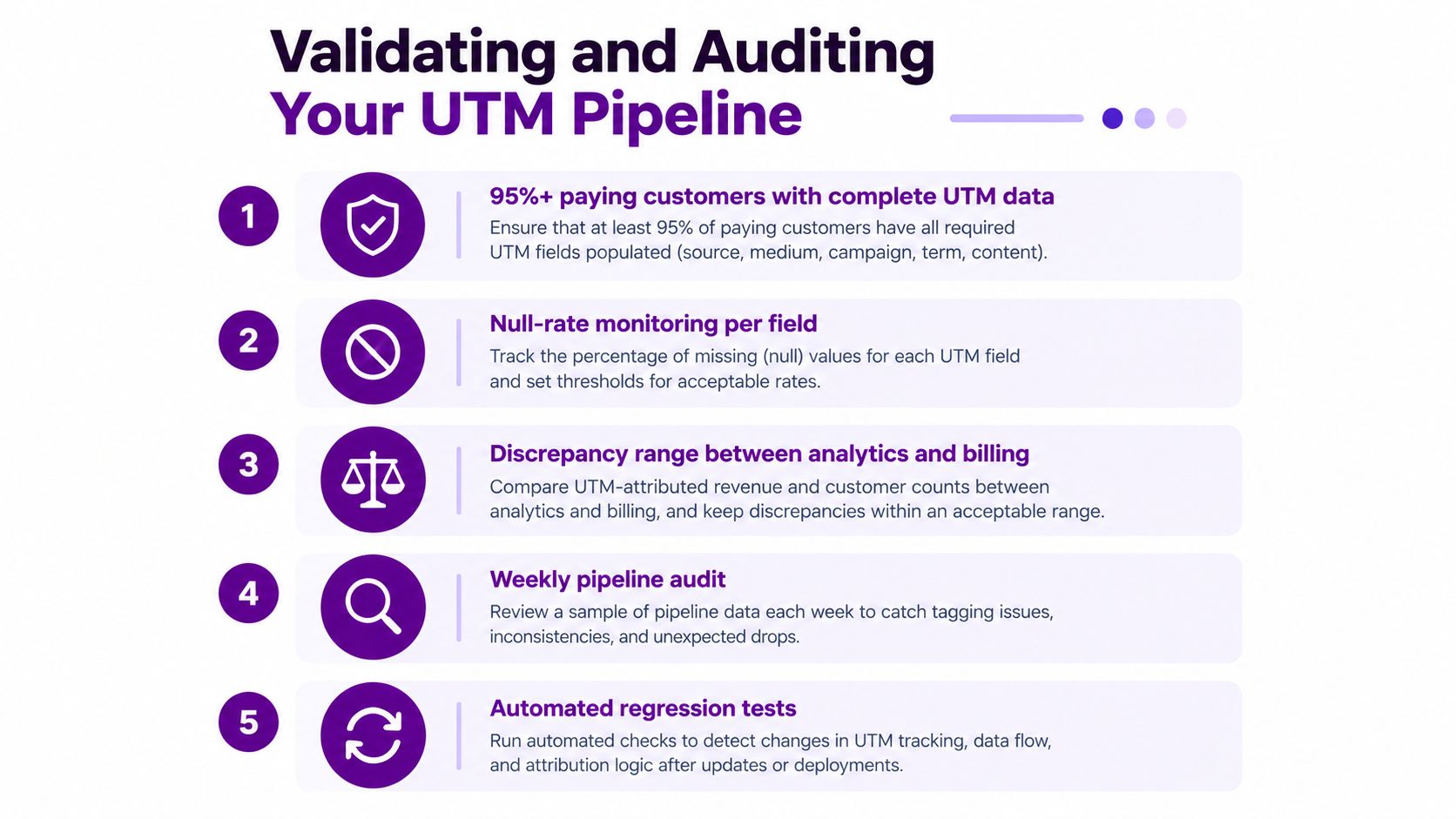
A structured audit process should compare paid-platform conversions against CRM or billing outcomes weekly. Discrepancies above about 10–15% are a tracking-quality problem rather than a real performance shift, and the target should be >90% UTM coverage on paid traffic with >95% source-field completion on closed-won deals, because full coverage is rarely realistic in a live SaaS funnel ad attribution problem and audit thresholds.
That gives you three useful checks:
- Coverage: Are most paying customers carrying complete source data?
- Null rate: Which UTM fields are missing most often?
- Reconciliation: Do billing totals and CRM-attributed totals line up closely enough to trust?
Catch taxonomy drift and stale cookies
New utm_source values should not appear without governance. If they do, someone is inventing variations and your reporting is splitting again. Stale cookies can also mislead you, because an old source can survive into a later session that had nothing to do with the original campaign. That's a tracking hygiene problem, not a marketing win.
Paddle's reporting docs are useful here because they frame subscription analytics as a reporting layer that spans acquisition, recurring revenue, and retention, which makes it easier to spot when the numbers drift away from the actual billing record Paddle billing reporting.
A monthly checklist keeps the pipeline honest:
- Webhook delivery: Confirm billing events arrived without gaps.
- Metadata population: Check that source fields are filled on customer and subscription records.
- Source coverage: Review how many closed-won deals still have attribution attached.
- Discrepancy review: Compare billing totals to CRM-attributed revenue.
- Taxonomy review: Retire old labels and block new one-off variants.
Operational Habits and Your Next Step With Chartsy
The maintenance rhythm is simple, but it has to be deliberate. Review source taxonomy weekly so rogue UTMs don't creep in, reconcile Stripe or Paddle monthly so attribution coverage stays healthy, and audit naming conventions quarterly so outdated campaign labels don't keep fragmenting your reports.
UTMs also have limits. They won't isolate halo effects, they won't tell you what happened from view-through exposure alone, and they won't measure word-of-mouth signups with confidence. They're a source-of-truth for tracked acquisition, not proof of causation. Once you accept that boundary, the reporting gets much more honest.
That's where Chartsy fits. It reads persisted UTM and billing records and turns them into source-level MRR dashboards, churn views, and plain-English analysis for teams that don't want to live in spreadsheets or SQL. It's a practical layer when you already have the data capture in place and need a clearer read on which sources produced paying customers, recurring revenue, and subscription movement.
Export the last 90 days of signup UTMs and the matching Stripe or Paddle customers, then compare them side by side before you make your next channel spend decision. If you want one place to ask which source produced revenue, Chartsy is built for that workflow.

Written by
Chartsy TeamAnalytics team at Chartsy
The Chartsy Team writes guides, product updates, and resources to help SaaS and eCommerce founders make sense of their metrics, without SQL or spreadsheets.
Chartsy
